
G555 Game App
18Mins Ago
4.88MB
Latest V1.3.33
Android2.5+
565553+

Description
The G555 Game name appears in searches for mobile entertainment, gaming, account access, and Android downloads. People researching the G555 App want guidance before registering or installing a file. This guide reviews advertised features, access, payments, and safety checks without treating promotions as verified facts. Readers should compare the actual terms on the site they visit, because search snippets and copied descriptions may omit important conditions.
Learn more from our dedicated M333Game and Jan111 Game page.
What Is G555 and How Does It Work?
The name is used online for gaming services accessed through websites or mobile interfaces. Listings may mention slots, card activities, arcade formats, number-based games, or sports markets, but availability varies by domain.
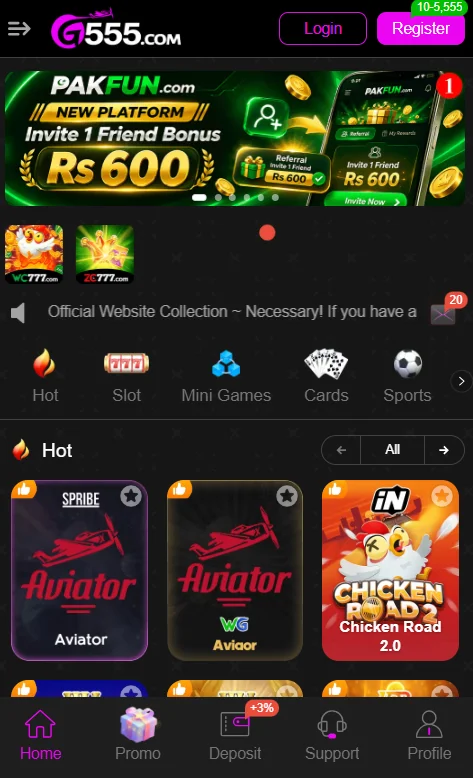
Where registration is required, visitors review the terms, create an eligible account, and use the service through a browser or supported application. Check the domain and publisher first, as third-party APK listings may have different operators.
Main Features of the Platform
Descriptions highlight gaming variety, mobile access, account tools, and promotions. Confirm availability on the specific website. A feature list should explain how each activity works, whether it is free to access, and whether extra conditions apply.
1. Multiple Gaming Categories
Listings may include slots, card activities, and arcade-style games. Read the rules first; wagering outcomes are uncertain and no strategy guarantees a return.
2. Mobile-Friendly Interface
A responsive website adapts menus and controls to smaller screens, although performance depends on the device, browser, and connection. Avoid repeated redirects, pop-ups, and unrelated installation requests. If pages load slowly, close unexpectedly, or repeatedly ask for permissions unrelated to their purpose, leave the site rather than disabling security settings.
3. Account Management
Account areas may show profile details, login settings, verification, and transaction history. Review active sessions when that option exists, and change credentials immediately if you suspect someone else has accessed the account. Use a unique password; never share it, a one-time code, or wallet PIN with purported support staff.
4. Payment Information
Third-party descriptions may mention mobile wallets or bank transfers, but fees, limits, and availability vary. Verify recipient details in the account area, keep receipts, and avoid personal numbers shared through unofficial chats.
5. Promotional Offers
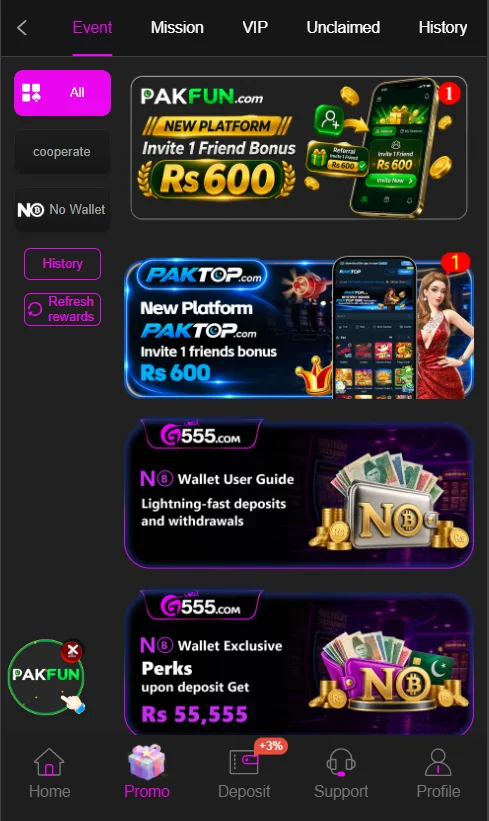
Welcome and referral offers may be advertised, but bonuses are not automatically withdrawable. Check eligibility, expiry dates, wagering rules, and restrictions before accepting them. Save a copy of the offer conditions, since promotional pages can change and account-specific terms may apply.
How to Access the Platform
Search results may show a browser-based website and separate pages offering an application file. Similar branding does not mean both are operated by the same provider.
Browser Access
Use a browser only when the site is mobile-friendly, the domain is correct, and its operator and terms are identifiable.
- Open an updated browser.
- Type the verified address yourself.
- Check the domain before entering personal details.
- Review age, location, privacy, and account conditions.
- Continue only when the service is clear.
Do not ignore browser warnings or proceed through pages that imitate another brand.
APK Download for Android
Third-party pages may offer a G555 APK, but a familiar logo does not prove authenticity. Treat each G555 APK listing as unverified until its publisher and file details are checked. Unofficial packages can contain modified code, ads, or unsafe permissions. Keep device protections enabled and do not install anything from an unverified source.
Download Checks Before Installing
A G555 Download page should identify its developer, version, file size, update date, and Android requirements. Before choosing a G555 Download, check those details carefully. Missing information, shortened links, and extra-app requests are warning signs. Prefer a verified app-store listing; otherwise, do not treat a third-party file as official.
G555 Registration Process
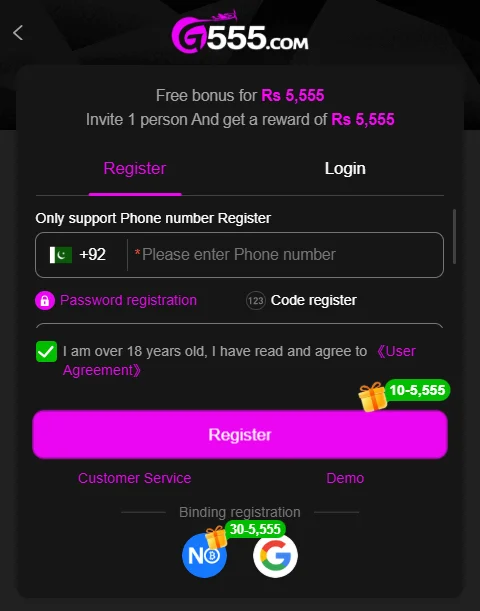
Requirements depend on the website. Follow its verified instructions; a typical process may involve:
- Select Register or Sign Up.
- Review age and location eligibility.
- Enter only the information legitimately required.
- Create a strong, unique password.
- Complete stated verification, if required.
- Read the user agreement and privacy policy.
Avoid services with hidden operators, missing terms, or unnecessary data requests. Keep confirmation details and check how to close the account.
Login Guide and Common Access Problems
Use the same verified website or application used during registration. If login fails, check the connection and spelling, then use the official reset process. Avoid links from strangers, sign out on shared devices, and contact support through the verified site. If a reset message arrives unexpectedly, do not use it; open the known website separately and check the account there.
Gaming Categories and Available Activities
The G555 Game App may be described as offering several entertainment formats. When comparing one G555 Game App listing with another, check that both identify the same operator and current catalogue.
Slot-Style Games
Slot-style activities use symbols and random outcomes. Read the rules and paytable; previous results do not predict future results.
Card-Based Activities
Card formats use hands, selections, or scoring rules. Check whether skill, fees, or wagering conditions apply.
Arcade-Style Activities
Arcade games often have short rounds. Check for purchases, ads, deposits, and personal-data collection.
Sports and Cricket Sections
Some sites advertise cricket or other sports markets. Check local law, licensing, age limits, and operator rules; a sports section does not prove authorisation.
Deposits and Withdrawals: What Users Should Understand
Before depositing, check payment methods, limits, fees, verification, processing times, and withdrawal rules. Do not send money when terms are missing. Confirm the recipient, save receipts, and never disclose banking passwords, wallet PINs, or one-time codes. Be wary of extra “release fees” or repeated deposit demands. Keep written records of conversations with customer support and do not send additional funds to unlock a balance unless the requirement is independently verified through the published terms.
Understanding Bonuses and Rewards
Check a bonus’s eligibility, expiry, qualifying activities, wagering requirements, and withdrawal rules. Do not share another person’s details for referrals or promise guaranteed earnings. Promotions should not distract from unclear ownership or weak security.
Is G555 Safe to Use?
A logo or encrypted connection does not prove trustworthiness. Verify the operator, publisher, privacy policy, support channels, and any claimed licence with the named regulator. Keep software updated and limit app permissions. Consider the G555 App only after checking its developer and distribution source; otherwise, do not share personal or payment details.
Advantages and Limitations
| Potential Advantages | Important Limitations |
|---|---|
| Several categories may appear in one place | The catalogue can differ between websites |
| Browser access may avoid installing an app | Similar domains may have different operators |
| Account tools may show profile and activity details | Privacy and verification practices need checking |
| Promotions may be advertised | Bonuses can carry restrictive conditions |
| Mobile layouts can support smaller screens | Unknown APK files may be unsafe |
| Payment methods may be listed | Availability and withdrawal terms require confirmation |
This comparison helps readers assess a service; it is not an endorsement of a particular website or application.
Tips for a Better and Safer Experience
Check the domain, company details, support information, terms, and privacy policy; a copied logo is not proof of authenticity. Read the rules, set personal limits, avoid borrowing or chasing losses, and confirm local legal and age requirements. If you choose not to continue, use the account-closure route and remove any downloaded file you no longer need.
Frequently Asked Questions
What is G555?
It is a name used by online listings for gaming services, but features and operators may differ across websites.
Is an Android application available?
Some third-party pages advertise APK files, but users should verify the developer and source before installing anything.
Can users access the platform through a browser?
Some listings describe browser access, although availability depends on the specific website and its regional restrictions.
What should users check before making a deposit?
Review licensing, payment recipients, fees, withdrawal rules, privacy terms, and local legal requirements before transferring any money.
Final Thoughts
G555 appears in listings promoting mobile gaming, account access, and downloadable applications, but services vary between operators. Before registering, installing an APK, or paying, verify the domain, publisher, terms, privacy practices, and legal eligibility. These checks help distinguish an established provider from a lookalike listing and reduce avoidable risks.
Download links
How to install G555 Game App APK?
1. Tap the downloaded G555 Game App APK file.
2. Touch install.
3. Follow the steps on the screen.